

If you’ve spent any time in developer communities lately, you’ve probably heard the term “vibe coding” thrown around constantly. And no it’s not about coding while listening to lo-fi beats (though that’s not off the table). Vibe coding is one of the most significant shifts in software development since the internet itself, and if you haven’t figured out where you stand on it yet, this guide will help you do exactly that.
By the time you finish reading, you’ll know what vibe coding actually is, why it blew up so fast, which tools are worth your time in 2026, and crucially – what the risks are that most people conveniently skip over.
What Is Vibe Coding? (And Where Did the Term Come From?)
The term was coined by Andrej Karpathy co-founder of OpenAI and former AI lead at Tesla back in February 2025. Here’s how he described it: a style of development where you “fully give in to the vibes, embrace exponentials, and forget that the code even exists.”
In plain English? You describe what you want to build in natural language. The AI writes the code. You test it, tweak your prompt, and repeat.
What makes vibe coding distinct from just “using GitHub Copilot” is the degree of surrender. It’s not about AI suggesting a line or two as you type it’s about AI generating entire applications, backends, UIs, and logic flows while you play the role of director rather than programmer.
The idea exploded almost instantly. Within a month of Karpathy’s tweet, Merriam-Webster listed “vibe coding” as a slang and trending expression. By November 2025, Collins English Dictionary had named it their Word of the Year. That’s not a buzzword trajectory – that’s a cultural moment.
Why Vibe Coding Blew Up So Fast
A few forces converged at exactly the right time to make vibe coding go from a tweet to a mainstream development paradigm in under 12 months.
LLMs got genuinely good at code. Modern large language models don’t just understand syntax – they understand software architecture, design patterns, and can anticipate where things are likely to break. Earlier AI coding assistants suggested snippets; today’s tools build complete, deployable applications.
The tools caught up. Platforms like Cursor, Lovable, Bolt.new, and Replit didn’t just bolt AI onto existing IDEs. They reimagined the development environment around the idea of prompting as the primary interaction. The result is a workflow that feels less like programming and more like having a conversation with an extremely capable senior engineer.
The numbers speak for themselves. According to multiple 2026 industry surveys, 92% of US developers now use AI coding tools daily. GitHub reports that 46% of all new code being committed globally is now AI-generated. Among Y Combinator’s Winter 2025 cohort, 21% of startups had codebases that were 91% or more AI-generated. The vibe coding market hit $4.7 billion in 2025 and is projected to reach $12.3 billion by 2027.
This isn’t a trend. It’s the new default.
How Vibe Coding Actually Works (Step by Step)
If you’ve never tried it, the workflow is simpler than you’d expect. Here’s what a typical vibe coding session looks like:
Step 1 : Write your high-level prompt. You open a tool like Lovable or Cursor and describe what you want. “Build a SaaS app where users can track their daily habits, log streaks, and get weekly email summaries.” That’s your brief.
Step 2 : The AI generates the initial build. Depending on the tool, it spits out a full application – UI, backend logic, database schema, file structure. For some tools, this takes under five minutes.
Step 3 : You test and iterate. You run the app, see what works, and use follow-up prompts to refine it. “Make the dashboard dark mode by default.” “Add a Stripe payment flow for premium subscriptions.” You’re directing, not coding.
Step 4 : Deploy. Many vibe coding platforms offer one-click deployment to production-grade environments. Some, like Google’s Firebase Studio, call this “vibe deploying” – removing the DevOps bottleneck entirely.
The entire process – from idea to live, shareable URL – can happen in a single afternoon. For anyone who’s watched a traditional software project drag on for months, that’s a stunning statement.
The Best Vibe Coding Tools in 2026
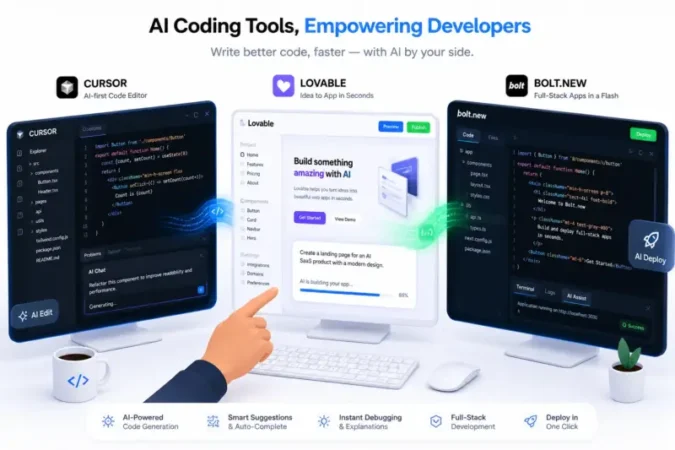
The vibe coding tool landscape exploded in 2025. There are now 138+ tools on the market, which is genuinely overwhelming. But they fall into two broad categories: AI app builders (for non-technical users who want to describe and deploy) and AI coding assistants (for developers who want AI acceleration without losing control of their codebase).
Here’s what the best tools look like in 2026, broken down by use case:
For Non-Technical Founders & Builders
Lovable is widely considered the best all-around tool if you want to go from natural language to a full-stack, deployable web application without writing any code. It handles design, backend logic, SEO, and custom domains. It’s opinionated (React + Supabase under the hood), which makes it beginner-friendly at the cost of flexibility. Pricing starts at $20/month, scaling to $100/month for production-level usage.
Bolt.new wins on raw speed. In benchmark tests, it consistently gets you from prompt to working prototype in around 28 minutes. It’s browser-based, requires zero setup, and generates a shareable URL you can send to stakeholders immediately. The tradeoff is code quality – it’s ideal for demos and hackathons but not something you’d want to ship to paying customers without a serious review pass. Free tier available; Pro at approximately $29/month.
Replit has evolved from an online IDE into a full vibe coding platform. Its AI agent builds apps from descriptions, and its real-time collaboration features make it the go-to for teams prototyping together. It’s also the best option for learners, with a massive template library and Python-first support. The free starter tier is genuinely usable.
For Professional Developers
Cursor is the power tool. Used by around seven million developers and a significant share of Fortune 1000 engineering teams, it’s an AI-first fork of VS Code with deep codebase awareness, multi-file editing, and intelligent refactoring. You still need to know how to code – Cursor accelerates your existing workflow rather than replacing it. At $20/month, it consistently tops productivity benchmarks for experienced engineers.
Windsurf offers a competitive alternative to Cursor at around $15/month – lower cost with comparable features. Worth evaluating if you’re price-sensitive but still want a serious IDE experience.
v0 by Vercel is specialized: it generates beautiful React/Tailwind components from prompts and is deeply integrated with the Next.js ecosystem. It’s not a complete app builder, but for frontend developers on Vercel stacks, it’s exceptional.
The Hybrid Workflow (What Most Serious Teams Actually Do)
The highest-leverage approach in 2026 isn’t picking one tool – it’s using two or three in combination. A common pattern: prototype rapidly in Lovable or Bolt.new to validate the idea, then pull the code into Cursor for precise iteration and long-term maintenance. This gives you the speed of vibe coding for exploration and the control of a professional IDE for production.
Vibe Coding vs. Traditional Development: What Actually Changed?
Traditional programming requires you to focus on implementation details – specific syntax, language rules, memory management, compilation errors. Vibe coding flips this entirely. You focus on desired outcomes and let the AI handle the implementation.
Think of it like going from being a chef who cooks every dish from scratch to being an executive chef who tells the kitchen team what to make. You still need to know what good food looks like. You still taste everything. But you’re not chopping every onion.
This shift is what’s enabling 63% of vibe coding users – who are non-developers – to build and ship software. Designers, product managers, founders, and domain experts who had ideas but lacked the technical chops to execute them are now building real applications.
For experienced developers, the productivity story is more nuanced (more on that in the risks section), but the direction is clear: the days when “non-technical” was a hard barrier to building software are quietly ending.
The Real Risks of Vibe Coding Nobody Talks About Enough
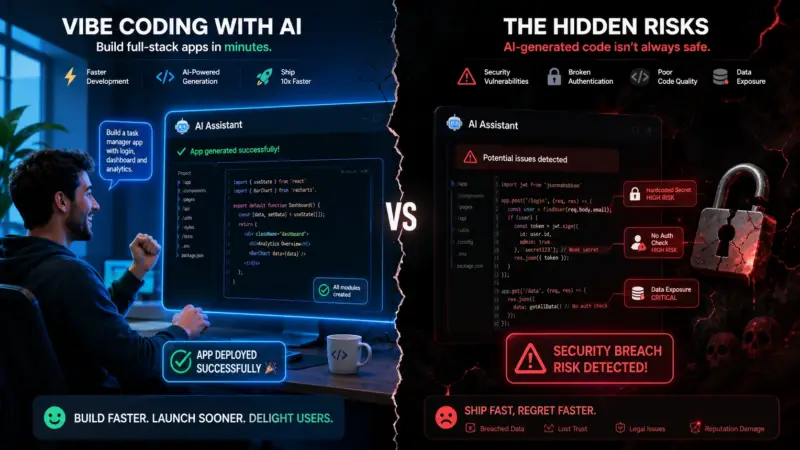
Here’s where most “vibe coding explainer” articles go soft. The risks are real, documented, and deserve honest treatment.
Security Vulnerabilities Are a Serious Problem
This is the elephant in the room. A 2025 Veracode GenAI Code Security Report found that approximately 45% of AI-generated code samples fail security tests and include critical vulnerabilities from the OWASP Top 10 – things like cross-site scripting and log injection. A separate CodeRabbit analysis of 470 open-source pull requests found that AI co-authored code showed 2.74 times higher rates of security vulnerabilities than human-written code.
The Lovable CVE-2025-48757 incident became the vibe coding industry’s first major public security crisis. Researchers found that 170 out of 1,645 Lovable-generated apps – more than 10% – had critical row-level security flaws in their Supabase configurations. These weren’t edge cases. They were apps handling real user data with exploitable access control gaps.
The lesson is simple but important: vibe coding tools optimize for speed of creation, not security by default. When most users lack the technical background to spot a missing authentication check or an exposed API key, the gap between “it works” and “it’s safe” can be enormous.
AI-Generated Code Is Harder to Maintain
When you don’t write the code, you often don’t fully understand it. And when something breaks six months later – which it will – you’re starting from a position of confusion rather than familiarity.
A Deloitte 2025 Developer Skills Report found that over 40% of junior developers admit to deploying AI-generated code they don’t fully understand. This creates knowledge gaps that make debugging significantly harder and compound over time as the codebase grows. January 2026 paper titled “Vibe Coding Kills Open Source” argued that this dynamic has measurable negative effects on the broader open-source ecosystem by reducing meaningful engagement between users and maintainers.
The Productivity Paradox for Experienced Developers
Here’s a counterintuitive finding. METR – an organization that evaluates frontier AI models ran a randomized controlled trial in mid-2025 involving experienced open-source developers. The result? They were 19% slower when using AI coding tools, despite predicting they’d be 24% faster and still believing afterward that they had been more productive.
The implication: AI coding tools can create an illusion of speed that doesn’t always translate into actual output. For complex, long-lived projects, the overhead of reviewing, correcting, and understanding AI-generated code can outweigh the initial generation speed.
The Trust Paradox
Perhaps the most telling signal: developer trust in AI-generated code has been falling even as adoption climbs. Favorable sentiment toward AI tools dropped from 77% in 2023 to 60% in 2026. Only 33% of developers say they trust AI code accuracy, down from 43% in 2024. And 96% of developers admit they don’t fully trust that AI-generated code is functionally correct – yet 48% don’t always review it before shipping.
The industry is increasingly reliant on something it doesn’t fully trust. That’s a tension worth watching.
How to Vibe Code Well (Practical Tips for 2026)
If you’re going to vibe code and you probably should experiment with it here’s how to do it in a way that actually works:
Write strong prompts. The single most important variable in vibe coding quality is prompt quality, and it’s the one you have the most control over. Teams with weak prompts spend 80% of their time fixing AI output. Teams with strong, specific prompts spend 80% of their time adding features. Be concrete: specify the stack, the user flow, the edge cases, and the constraints upfront.
Always review before shipping. This is non-negotiable for anything with real users or real data. AI-generated code can pass basic tests while hiding serious security or logic issues. Treat AI output as a first draft, not a finished product. Run security scanning tools. Have someone with coding experience review the critical paths.
Use the right tool for the stage. Lovable or Bolt.new to validate the idea. Cursor or Claude Code to build the production version. Don’t try to maintain a complex, long-lived codebase in a tool that was designed for rapid prototyping.
Keep learning the fundamentals. This is especially important if you’re newer to development. The engineers who thrive in vibe coding environments are the ones who understand code well enough to catch what AI gets wrong. If you never build that understanding, you’re dependent on AI in a way that will eventually bite you.
Pair with good open-source models when cost matters. For exploratory prototyping where budget is a concern, pairing vibe coding with capable open-source models can dramatically reduce costs without sacrificing too much quality. Our guide to the best open-source models for coding in 2026 covers the best options available right now.
Who Should Be Vibe Coding Right Now?
The honest answer is: almost everyone in the technology space should at least understand it and have experimented with it. But the right level of adoption depends heavily on your context.
Non-technical founders should be diving in. The gap between having an idea and having a working prototype has collapsed. If you’ve been waiting for a technical co-founder to start building, that calculus has changed significantly.
Product managers and designers will find vibe coding invaluable for building interactive prototypes that go beyond static mockups. The ability to test real user flows with real data is transformative for product development.
Experienced developers should be using AI coding assistants (Cursor, Claude Code, Windsurf) to accelerate their existing workflows not abandoning code review or architectural judgment, but using AI to handle the repetitive and mechanical parts of development.
Students and early-career developers should approach with caution. The temptation to outsource all code writing to AI is real, but building foundational understanding of how code works remains essential for long-term career resilience. Use vibe coding as a complement to learning, not a replacement for it.
The Future of Vibe Coding: Where This Is All Heading
Gartner forecasts that 60% of all new code will be AI-generated by the end of 2026. The total addressable market for AI-assisted software creation is projected at $325 billion by 2040. These aren’t fringe estimates they represent a consensus view across major analyst firms.
The direction of travel is toward agentic engineering systems where AI agents don’t just write code in response to prompts, but plan, decide, and implement autonomously across entire development lifecycles. Early versions of this are already visible in tools like Gemini CLI and Replit’s agent, where you can describe a feature and let AI scaffold the logic, configuration files, and UI without additional prompting.
AI-native development environments will likely become the default interface for most development teams in the next few years. The question isn’t whether AI will play a central role in how software gets built it already does. The question is how developers, teams, and organizations build the right habits, review processes, and quality controls to make that a net positive.
Final Verdict: Is Vibe Coding Worth It?
Vibe coding is real, it’s here, and it’s changing the economics of software development in ways that are hard to overstate. The ability to go from idea to deployed application in hours rather than weeks is genuinely transformative for founders, builders, and product teams.
But it comes with strings attached. Security vulnerabilities are higher than with hand-written code. Maintainability suffers when nobody truly understands what’s running in production. And the productivity gains for experienced developers are more modest than the hype suggests.
The teams and individuals who are getting the most out of vibe coding in 2026 aren’t the ones who have fully surrendered to the AI. They’re the ones who use AI as a powerful accelerant while maintaining the judgment, review discipline, and architectural thinking that separate good software from software that just barely works.
Vibe coding won the adoption war. The quality war is just getting started.
Enjoyed this guide? Explore more on AI tools and development at IndianPrompt including our deep dives on the best open-source coding models available today.