
If you opened your GitHub billing page recently and felt a small jolt of panic, you are not alone. In June 2026, GitHub changed how it charges for Copilot and developer forums lit up with screenshots of bills jumping from a comfortable flat fee into the hundreds, even thousands, of dollars.
But here is the part most of the angry headlines leave out: for a huge number of developers, the bill did not change at all. Whether GitHub Copilot’s new pricing hurts you depends entirely on how you use it.
This guide breaks down exactly what GitHub Copilot costs in 2026, what is still completely free, what the change means for developers in India, and which alternatives actually save you money. Every number here is based on GitHub’s official pricing and verified developer reports.
What Changed in GitHub Copilot Pricing
For three years, Copilot worked like a gym membership: pay a flat monthly fee, use it as much as you want. That era ended on June 1, 2026, when GitHub moved every Copilot plan to usage-based billing.
The old system measured your usage in “Premium Request Units.” When you ran out, Copilot quietly slowed you down by switching to a lighter model but you kept working, and your bill stayed the same. That safety net is now gone.
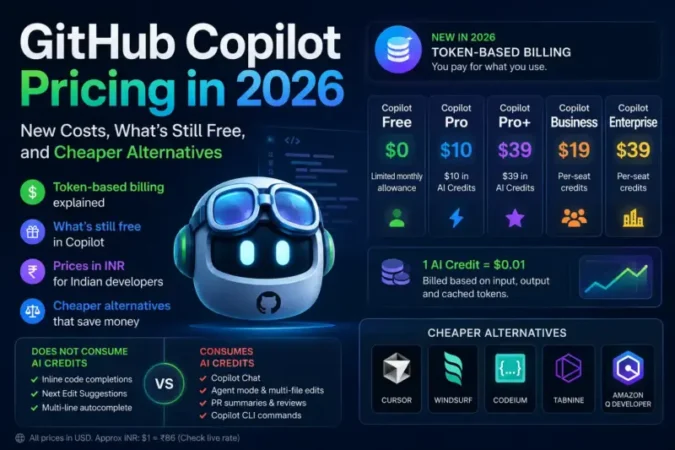
Under the new model, GitHub charges you based on the actual tokens your requests consume input, output, and cached tokens converted into something called GitHub AI Credits. The conversion is deliberately simple: one AI Credit equals one US cent ($0.01). These credits are charged on top of your base subscription, which has not increased.
The single most important change is psychological: the old flat fee had a ceiling, and the new one does not unless you set one yourself. We will cover how to do that below, because it is the most important step you can take today.
GitHub Copilot Plans and Prices in 2026
Here is the key thing to understand the base subscription prices stayed exactly the same. What changed is what those prices include.
| Plan | Monthly Price | Included AI Credits |
|---|---|---|
| Copilot Free | $0 | Limited monthly allowance |
| Copilot Pro | $10/month | $10 in AI Credits |
| Copilot Pro+ | $39/month | $39 in AI Credits |
| Copilot Business | $19/user/month | Per-seat credits |
| Copilot Enterprise | $39/user/month | Per-seat credits |
Each paid plan now bundles a monthly allotment of AI Credits matching its price. Once you burn through those included credits, any further chat or agent usage is billed on top at the published token rate of whichever AI model handled your request.
For Indian developers, here is a rough idea in rupees (at approximately ₹86 to the dollar always check the live rate, as GitHub bills in USD):
- Copilot Pro: about ₹860/month
- Copilot Pro+: about ₹3,350/month
- Copilot Business: about ₹1,630/user/month
Remember, these are just the base fees. Your real cost depends on how much chat and agent usage you stack on top. For the most current numbers, always check GitHub’s official Copilot pricing page before subscribing or upgrading.
What’s Still Free in GitHub Copilot
This is the section that should calm most developers down. GitHub drew a clear line, and a big chunk of everyday Copilot use costs nothing extra.
These features do NOT consume AI Credits:
- Inline code completions (the grey “ghost text” suggestions)
- Next Edit Suggestions
- Multi-line autocomplete
These features DO consume AI Credits:
- Copilot Chat (in your editor, the CLI, or the web)
- Agent mode and multi-file edits
- Pull request summaries and code reviews
- Copilot CLI commands
In plain terms: if you mostly rely on Copilot’s autocomplete to finish your lines and functions as you type, your bill basically does not change. The new costs hit hardest for people running AI “agents” that read and rewrite large parts of a codebase automatically exactly the heavy workflows that consume enormous numbers of tokens.
Why Your Bill Might Jump (And Why It Might Not)
The viral claims of bills jumping from $29 to $750 a month are real, but they represent a specific, extreme type of user not the average developer. Here is a more honest picture of who pays what, based on developer reports from the first weeks of the new system.
The autocomplete developer. Uses code completions most of the time, opens chat a few times a day for quick questions. Monthly increase: roughly $3–5, or close to nothing. No real impact.
The heavy chat user. Lives inside Copilot Chat, firing 30–40 sessions a day at a premium model for complex problems. Estimated extra cost: $150–250 per month on top of the subscription, where they previously paid a flat fee.
The agentic team. Developers running AI agents against a large codebase all day for automated refactoring the kind of “vibe coding” workflow that has exploded in popularity through 2026. This is where the scary numbers come from early estimates of $600–1,200 per developer per month, and one widely shared report in GitHub’s own community discussion thread of a three-person team’s projected bill jumping from $50 to $3,000.
So the truth sits in the middle. Most individual developers will barely notice. Teams running aggressive AI automation will feel it sharply. The reason is simple: a frontier AI model doing an hour of autonomous codebase work can cost hundreds of times more than a quick chat question, and a single flat fee was never going to cover that gap forever.
The Model You Pick Changes Everything
Under the new system, the AI model you choose for chat and agent work has an enormous effect on your bill we are talking an order-of-magnitude difference. Cheaper “economy” models cost a fraction of premium “frontier” models for the same task.
As a rough illustration: a focused chat session might cost only a fraction of a cent on an economy model like GPT-5 mini, but ten to fifteen times more on a premium model like Claude Sonnet 4.6. If you’re trying to decide which AI model is actually worth the premium price for serious work, our Claude vs Gemini document analysis comparison breaks down where the extra cost pays off. Multiply the per-session difference across a full month of daily use, and the gap between a thoughtful model choice and a careless one can mean the difference between a few dollars and well over a hundred.
The takeaway: reserve the most powerful models for genuinely hard problems, and let a fast, cheap model handle routine questions, explanations, and quick debugging.
How to Stop GitHub Copilot From Overcharging You
If you take only one action after reading this, make it this one. By default, GitHub does not stop your usage when you hit a spending limit it just sends a notification while the charges keep accruing. You have to switch on the hard cap yourself.
Here is how to protect yourself:
First, set a hard spending cap. Go to your GitHub billing settings, then Spending limits. Set a monthly dollar amount and this is the critical part tick the box that says “Stop usage when budget limit is reached.” Without that checkbox, your limit is just a suggestion.
Second, change your default chat model to an economy tier for everyday work, and only switch to a premium model when you genuinely need deep reasoning.
Third, lean on code completions, which remain free and unlimited. If autocomplete does most of your work, you are already in the cheapest possible setup.
Fourth, keep your AI’s context tight. Agent sessions that pull your entire codebase into memory rack up input tokens fast. Point Copilot at the specific files that matter instead.
Finally, watch your usage dashboard in the first couple of weeks. GitHub shows your spending per model, so you can spot an expensive habit before it becomes an expensive bill.
Is GitHub Copilot Still Free for Students in 2026?
This is one of the most common questions from India, where a large share of Copilot’s users are students and early-career developers. GitHub has historically offered Copilot at no cost to verified students through the GitHub Student Developer Pack, and the free Copilot tier also remains available with a limited monthly allowance.
Because the details of student access can change, the safest move is to verify your current eligibility directly through GitHub’s official education program rather than relying on any third-party claim. If you qualify, you get meaningful Copilot access without touching the new paid credit system at all which makes the whole pricing controversy a non-issue for many students.
Best GitHub Copilot Alternatives in 2026
If you have done the math and the new pricing does not work for your workflow, the good news is that 2026 has more strong competitors than ever. Here is an honest look at the main options.
Cursor (around $20/month). A flat-fee AI code editor with a generous built-in allowance for its agent features. For developers running regular agentic sessions, Cursor’s predictable pricing is a strong argument over Copilot’s metered model.
Windsurf (around $20/month and up). Another flat-fee editor that has been aggressive about including frontier model access. Its per-seat pricing compares well for teams once you factor in Copilot’s token overages.
Claude Code (around $17–$100/month). Anthropic’s terminal-based coding agent, built for deep, extended work on a codebase. It offers predictable flat costs within generous plan limits, which appeals to developers who want power without a variable bill. If you’re curious how Anthropic’s broader model lineup has been shifting in 2026, our coverage of Anthropic’s Fable 5 and Mythos 5 model suspension is worth a read — it shows how fast the frontier model landscape is moving right now.
Cline (free to install, you pay the AI provider directly). A free VS Code extension that connects straight to the AI provider of your choice at raw API rates, with no middleman markup. Ideal if you are comfortable managing your own API keys and want full cost transparency.
The hybrid approach. Many developers are landing on a clever combination: keep Copilot Pro at $10/month purely for its free, unlimited code completions, then add a flat-fee tool like Cursor or Claude Code for all chat and agent work. The total often lands around $27–$30 a month, with both completion and agent workflows effectively uncapped.
For most individual Indian developers, the honest recommendation is to first check whether you even need to switch. If you are an autocomplete-driven coder, staying on Copilot Pro and ignoring the drama is perfectly rational. If you run heavy agent workflows, a flat-fee alternative will almost certainly save you money.
The Bottom Line
GitHub Copilot’s 2026 pricing change is not the disaster the viral screenshots suggest, but it is not nothing either. It is a shift from predictable to variable costs, and it rewards developers who understand how they actually use the tool.
If completions are your main workflow, relax set a spending cap for safety and carry on. If chat and agents are central to how you code, do the math, choose your models deliberately, and seriously evaluate whether Cursor, Claude Code, or a hybrid stack fits your budget better.
The wider lesson is that the age of unlimited AI for a flat fee is quietly ending across the whole industry. Knowing how to manage token costs is becoming a core developer skill and getting ahead of it now will save you money for years.
Frequently Asked Questions
Did GitHub Copilot’s subscription price go up in 2026? No. The base prices stayed the same Copilot Pro is still $10/month and Pro+ is still $39/month. What changed is that heavy chat and agent usage beyond your included AI Credits is now billed separately based on tokens.
Is GitHub Copilot autocomplete still free? Yes. Inline code completions, multi-line suggestions, and Next Edit Suggestions do not consume AI Credits on any plan. Only chat, agent mode, code review, and CLI usage draw from credits.
How can I avoid a surprise Copilot bill? Go to Settings, then Billing, then Spending limits, set a monthly cap, and enable “Stop usage when budget limit is reached.” Without that checkbox, GitHub only warns you instead of stopping charges.
What is the cheapest alternative to GitHub Copilot? Cline is free to install and only charges you the underlying AI provider’s API rates. Among flat-fee tools, Cursor and Windsurf at around $20/month are popular choices for developers who want predictable pricing.
Is GitHub Copilot worth it in 2026 for Indian developers? For autocomplete-focused developers and eligible students, yes the free and $10 Pro tiers remain great value. For heavy agentic users, a flat-fee alternative often works out cheaper once token costs are included.
This article is based on GitHub’s official pricing announcements and verified developer reports as of June 2026. Pricing and plan details can change always confirm current costs on GitHub’s official pricing page before subscribing.